Decades ago, people were always changing their phone numbers. If you moved to a new place, you’d get a new number. But things are different these days. Now, you can hang on to your first cellphone number forever, even if you move to a new continent, as long as you’re willing to pay for it.
That has downsides, though. Having another number associated with you for life, much like your Social Security or driver’s license number, makes it another easy way for bad actors and Big Brother to track you. Especially since your mobile phone number is likely associated with just about every digital account you have.
One way to avoid this is to never hand out your personal phone number, except to close friends and family. There are a lot of good reasons for this. Perhaps you buy or sell items on Facebook Marketplace, manage an Airbnb listing, are hunting for a job, or you’re online dating.
Give all of them a burner number.
Historically, a burner is a no-contract, prepaid mobile phone, usually an ultracheap handset you buy in a store (with cash, for privacy), activate, use for a while, and then discard. The throwing away is the “burning” part, but tossing the phone and number is optional, as you can “top off” the minutes on a prepaid phone and keep using it. With a burner, you don’t have to block a person (be they a stalker, shady marketer, or robocaller) from your permanent phone. Nor do you need to get a new number. But the option is there, while your original phone number remains intact.
For a second number, you could always get a prepaid SIM card on a cheap carrier. That’s a handy option if you have an extra phone around. Many new unlocked phones support eSIM standards, where the SIM that identifies you with the carrier is fully integrated and changeable via software. Some phones support multiple phone numbers per eSIM. Even wireless carriers are embracing dual-SIM options. For instance, Verizon has a plan that lets you add a second number to your dual SIM device for just $15 a month.
You probably already have an expensive iPhone or Android smartphone, so you don’t want another handset, and dealing with SIMs is a pain. Thankfully, a long time ago, I found a way to add an extra, possibly temporary phone number that works with your smartphone (or even on your tablet) via burner apps and services, aka “second number apps.” The numbers they generate can even be used to send and receive texts with photos.
Having a second line via an app isn’t like using *67 or #31# before a call, which shows you as “blocked” or “unknown.” The burner services and apps below make a point of displaying that new number when you call, so return calls can happen—until you want them to stop. If you just want to take calls, all the options below include features like voicemail and call forwarding.
There are some drawbacks to burner apps and services. The biggest is that you typically can’t use them to call 911 for help. Many services build that limitation into their terms of service to avoid being sued. Second, these solutions have a very limited number of phone numbers; you could end up on the receiving end of calls from people trying to reach someone who previously had your number.
If you can overlook all that and still need a secondary and potentially temporary number, check out these apps and services.
- Three-day trial; seven days for new accounts
- Unlimited texts, talk, and pictures: $9.99 per month or $59.99 per year subscribed via iOS; otherwise $6.99 per month or $47.99 per year
Burner (available for iOS and Android) grabbed the best name for this kind of product. Restricted to US and Canadian numbers, the service offers limited-time access to certain digits. If your account or free trial lapses without an upgrade, so does the number. The premium subscription option provides up to three phone numbers with unlimited minutes and texts.
It’s best to register your Burner subscription on the web rather than the mobile app so Apple or Google aren’t involved in the transaction. (Burner charges you extra every month if you subscribe via the app.) It promises it’s 100% ad-free, blocks spammers, and also supports picture messages.
When you make a call via Burner, your smartphone calls Burner, which in turn places a relay call to the number you want to reach (so it does eat up your talk plan minutes). And it’s not confusing at all: The steps are spelled out as you go.
- Three-day trial
- $5.99 for one month prepaid with limited credits for Canada, UK, and US
- $4.99 per month auto-renewing for unlimited calls/texts for Canada, UK, and US
- Pay-as-you-go international plans starting at $6.99
Hushed (available for iOS and Android) offers service in over 40 countries, with a level of simplicity that makes it worth considering. Don’t worry about the minutes left on your actual mobile phone contract; Hushed uses VoIP, so calls are made over Wi-Fi (or using your cellular data). No minutes on your phone voice plan get used (unless you set up something like Call Forwarding or Call Routing). Subscribers can get up to three lines bundled. Text communications between Hushed app users are free and auto-deleted after they’re read.
Google Voice
- Free for individuals in US, Canada, the UK, and Ireland
- $10 per user per month for business use (up to 10 users in 10 locations) to start; $20 per user per month for unlimited users and locations
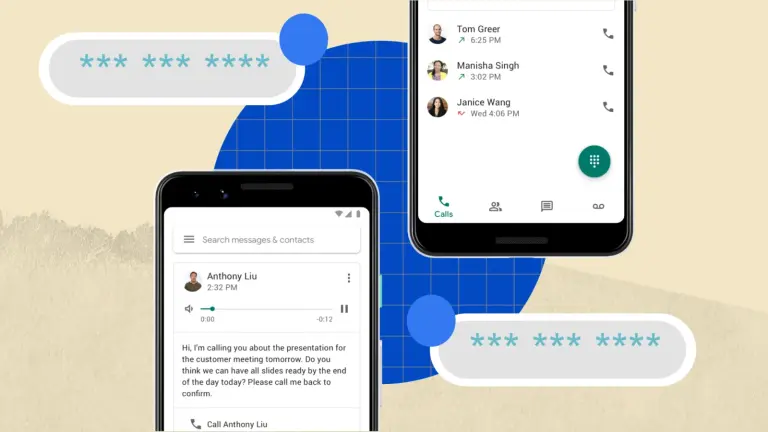
The main purpose of Google Voice is to provide call routing using a single phone number that rings on all your numbers—completely free of charge. That way, if an important call comes in, it will go to your cell, home, and office numbers, and others simultaneously—you simply pick up the one you want. This is less and less an issue in the one-phone-per-person mobile world, but hey, at least you have a permanent second number that costs nothing.
The Google Voice app features a dialer so you can call or text out. The recipient will see your Google Voice number for caller ID; if they return the call, you’ll receive it at the preset number (or get a voicemail with full-text transcription). It’s entirely VoIP, so it can use Wi-Fi or your phone data plan, and it works via apps on iOS and Android or even on the web.
If you have a personal Google account, you’ve already got a Google Voice account. So go get a number.
